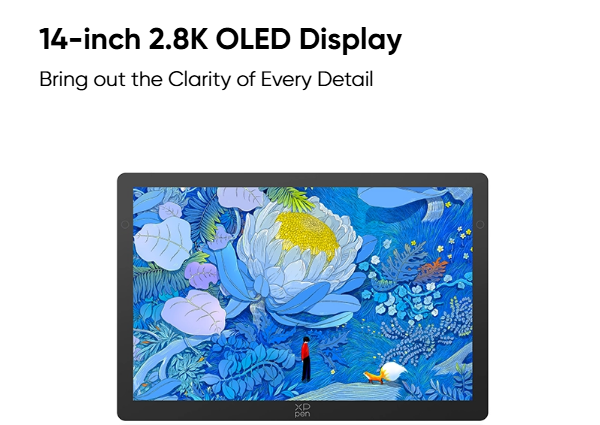

If you are looking for a compact drawing display that does not compromise too much on visual quality, the XPPen Artist Ultra 14 deserves a closer look. Although the product is officially named the Artist Ultra 14, it targets users searching for a portable, high-resolution pen display for illustration, graphic design, photo editing, and other creative work. Its combination of a 14-inch 2.8K OLED screen, 90Hz refresh rate, native 10-bit color depth, and 99% Adobe RGB coverage makes it an interesting option for anyone comparing a Best Pen Display Drawing Tablet for professional or everyday creative use.
But specifications alone do not tell you whether a drawing display is actually worth buying. Pen response, color accuracy, screen clarity, touch controls, portability, and workflow efficiency all affect the experience. In this xppen artist 14 pen display review, we will look closely at the display, stylus performance, and everyday usability to determine where the Artist Ultra 14 stands and who can get the most value from it.
1. XPPen Artist 14 Pen Display Review: An Overview
The XPPen Artist Ultra 14 is designed around a simple idea: deliver a professional drawing experience in a form factor that is easier to carry than a conventional large pen display. Measuring approximately 330.4 × 221.6 mm, the device is only 6 mm thick at its thinnest point, making portability one of its defining characteristics. The aluminum alloy rear panel also contributes to durability and heat dissipation.
The display uses a 14-inch 16:10 panel, rather than the more common 16:9 ratio. That extra vertical space can be useful when working with long canvases, menus, and tool panels because you get a little more working height without constantly zooming or scrolling. The relatively narrow 14.5 mm bezel also gives the screen a more immersive appearance.
The hardware specifications are particularly notable for a device of this size:
· 14-inch 2.8K OLED display
· 2880 × 1800 resolution
· Approximately 243 PPI
· 90Hz refresh rate
· Less than 1ms response time
· Native 10-bit color depth
· 99% Adobe RGB coverage
· 100,000:1 contrast ratio
· 16,384 pressure levels
· Up to 60° tilt recognition
This combination places the Artist Ultra 14 well beyond the basic entry-level category. In practical terms, the device is trying to appeal to creators who care about both visual fidelity and portability rather than simply looking for the largest possible screen.
2. XPPen Artist 14 Pen Display Review: How Good Is the Screen?
For any pen display, the screen is where the entire creative workflow begins. The Artist Ultra 14 makes a strong case here with its 2.8K OLED panel, high pixel density, wide color gamut, and fast refresh rate.
2.1 Does the 2.8K OLED Display Make a Difference?
The 2880 × 1800 resolution gives the 14-inch display approximately 243 PPI, considerably denser than a 1080p panel of the same size. This matters when working on detailed illustrations, fine line art, or high-resolution photographs.
A high pixel density allows small visual elements to remain sharper, particularly when zooming into a drawing. Hair strands, facial details, thin outlines, and subtle texture work can benefit from the additional screen detail.
The OLED panel also provides a 100,000:1 contrast ratio, which allows darker areas to appear deeper and helps separate shadows from highlights. For artwork involving strong lighting, dark backgrounds, or subtle tonal transitions, that can make the image easier to evaluate visually.
The 90Hz refresh rate is another useful addition. While refresh rate is not as critical for static artwork as it is for gaming, it can make canvas movement, scrolling, zooming, and interface animations feel smoother. XPPen also specifies a response time below 1ms, which is intended to reduce visible trailing during interaction.
2.2 Is the Color Performance Suitable for Creative Work?
Color performance is one of the more compelling aspects of this xppen artist 14 pen display review.
The display offers native 10-bit color depth, allowing it to represent approximately 1.07 billion colors. More importantly for creative professionals, it covers 99% Adobe RGB, alongside broad coverage of sRGB and Display P3. XPPen also lists an average Delta E below 1 in Adobe RGB mode and identifies the display as Calman Verified.
For illustrators, photographers, and graphic designers, these specifications are more meaningful than simply having a high resolution. A wider color gamut provides access to a broader range of colors, while accurate reproduction helps creators make more reliable decisions when adjusting tones and hues.
The display also uses AG nano-etched glass and an AF coating. These features are designed to reduce reflections and improve viewing comfort, while TÜV SÜD low-blue-light certification provides an additional consideration for users who spend long periods working on screen.
3. XPPen Artist 14 Pen Display Review: What Is the Drawing Experience Like?
A beautiful screen is only half of the equation. The stylus determines how naturally your hand movements translate into digital marks, and this is another area where the Artist Ultra 14 is strongly equipped.
The device comes with two X3 Pro series styluses: the X3 Pro Smart Chip Stylus and the X3 Pro Slim Stylus. Both support 16,384 pressure levels and up to 60° of tilt recognition. The standard stylus includes two customizable shortcut buttons and a digital eraser, while the Slim Stylus offers a lighter, slimmer design with customizable buttons.
3.1 Does 16K Pressure Sensitivity Matter?
A specification such as 16,384 pressure levels does not automatically make a drawing experience better, but it gives the input system a broad range for translating changes in hand pressure into digital output.
This can be useful when working with pressure-sensitive brushes. A light stroke can produce a thinner or more transparent mark, while additional pressure can create greater line weight or opacity. For sketching, inking, shading, and brush-based painting, that range gives artists more room to control their strokes.
XPPen specifies an initial activation force of 3g, which is particularly relevant to artists who prefer a light touch. The company also lists a central-area cursor accuracy of approximately ±0.4 mm. These figures suggest that the pen system is designed for controlled, detailed work rather than broad strokes alone.
3.2 Is 60° Tilt Recognition Useful?
Tilt recognition becomes more valuable when working with brushes that simulate traditional drawing tools.
For example, a pencil-style brush can react differently when the stylus is held upright compared with when it is angled. This makes it possible to create broader shading or varied stroke shapes without constantly changing brush settings.
The Artist Ultra 14 supports up to 60° of tilt, while its reported responsive height is 10 mm. XPPen notes that these figures come from laboratory testing, so actual performance can vary depending on the environment and setup.
From a practical perspective, the combination of high pressure sensitivity and tilt support makes the device particularly interesting for artists who rely heavily on brush dynamics rather than simply using the pen as a mouse replacement.
4. XPPen Artist 14 Pen Display Review: Is It Convenient to Use?
The most distinctive advantage of the Artist Ultra 14 may be how much functionality XPPen has packed into a relatively small device.
At approximately 6 mm at its thinnest point, the display is easy to move between workspaces. Its compact size also makes it more practical for creators who occasionally work away from a permanent desk. The curved edges are designed to reduce pressure around the wrist, while the aluminum alloy back helps provide a solid structure.
4.1 Does USB-C Make the Setup Easier?
The included full-featured USB-C connection can carry video, data, and power through a single cable when the connected computer or device supports the required functions.
This is useful for laptop users because it can significantly reduce cable clutter. However, USB-C ports are not identical. The computer must support the appropriate video output capability, and the available power can affect how the display operates. XPPen also notes that some mobile devices may need an external power source for stable operation.
Therefore, checking your computer’s USB-C specifications before buying is still important.
4.2 How Useful Are the Touch and Shortcut Features?
The Artist Ultra 14 uses X-Touch to support multi-point gestures for actions such as zooming, sliding, and rotating the canvas. Three-, four-, and five-finger gestures can also be customized through the driver. A non-touch area can be defined to reduce accidental input during detailed drawing.
The workflow can be expanded further with the included ACK05 shortcut remote, which supports up to 40 customizable shortcut functions through the driver. The display also comes with an ACS20 stand providing a 19° support angle.
These features make the Artist Ultra 14 more than a simple screen with a pen. Once shortcuts and gestures are configured around a specific workflow, repetitive actions such as zooming, undoing, switching tools, and navigating the canvas can be handled with fewer keyboard and mouse movements.
See also: The Impact of Technology on Media
5. XPPen Artist 14 Pen Display Review: Is It Worth Buying?
The final verdict of this xppen artist 14 pen display review comes down to what you expect from a 14-inch drawing display. Artist Ultra 14 combines a 2.8K OLED screen, 90Hz refresh rate, 10-bit color, 99% Adobe RGB coverage, and 16,384 pressure levels in a remarkably compact design.
Its strongest appeal is the balance between professional visual performance and portability. Artists who value accurate color, detailed drawing, responsive pen input, and the ability to move their setup between locations will find plenty to like.
However, size remains an important consideration. A 14-inch screen cannot provide the same physical workspace as a 22-inch or larger pen display. If you primarily create at a fixed desk and prefer a large canvas, a bigger model may make more sense. But if portability is part of your workflow, the Artist Ultra 14 offers a compelling combination of size, display quality, and drawing functionality. Overall, the XPPen Artist Ultra 14 is worth considering for creators who want professional-level features without committing to a bulky desktop drawing display.

 By
By